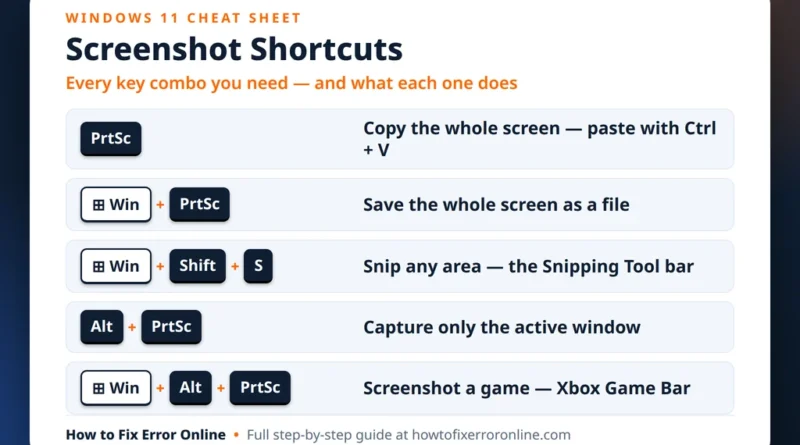
How to Take a Screenshot on Windows 11: 7 Ways
If you are wondering how to take a screenshot on Windows 11, you have more options than you might expect.
Read More
Windows, Outlook, Teams & PC Errors Fixed Step by Step
Windows, Outlook, Teams & PC Errors Fixed Step by Step
Not everything here is about fixing what is broken — some of it is about making Windows 11 faster, clearer and more pleasant before anything goes wrong. This section collects our practical know-how guides: the settings most people never find, the keyboard shortcuts that save real time every day, and the small changes that make a PC feel noticeably quicker. Every tip is a genuine Windows 11 feature shown with its real screen, and each guide is written so you can follow just the one section you need.
A good place to begin is 15 Windows 11 tips and tricks most users don’t know — Snap Layouts, clipboard history, Focus sessions and more, each with the exact clicks to turn it on. If you regularly need to show someone what is on your screen, How to take a screenshot on Windows 11: 7 ways compares every method — full screen, one window, a snip you can annotate — and, just as usefully, explains where each kind of screenshot is saved afterwards, which is where most people lose them.
Have a Windows question you would like turned into a simple guide like these? Send it to servicedesk@howtofixerroronline.com — available 24 hours — and it may become the next one we publish.
If you are wondering how to take a screenshot on Windows 11, you have more options than you might expect.
Read More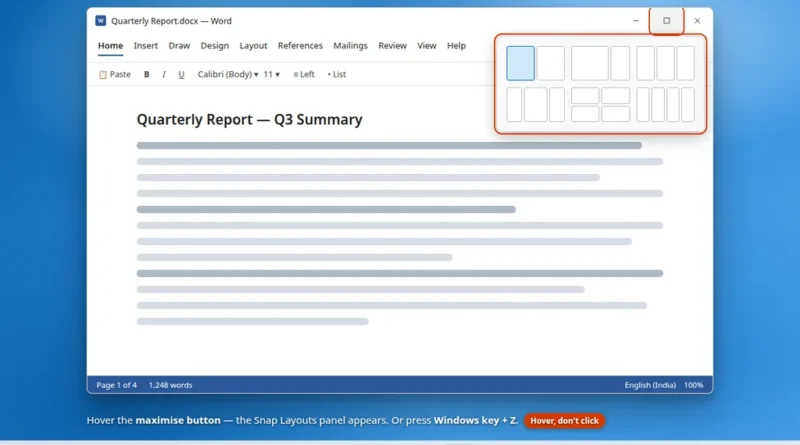
Windows 11 hides some of its best features in places nobody looks. There is a clipboard that remembers everything you
Read More