
Shaw Email Not Receiving in Outlook: The mail.shaw.ca Fixes
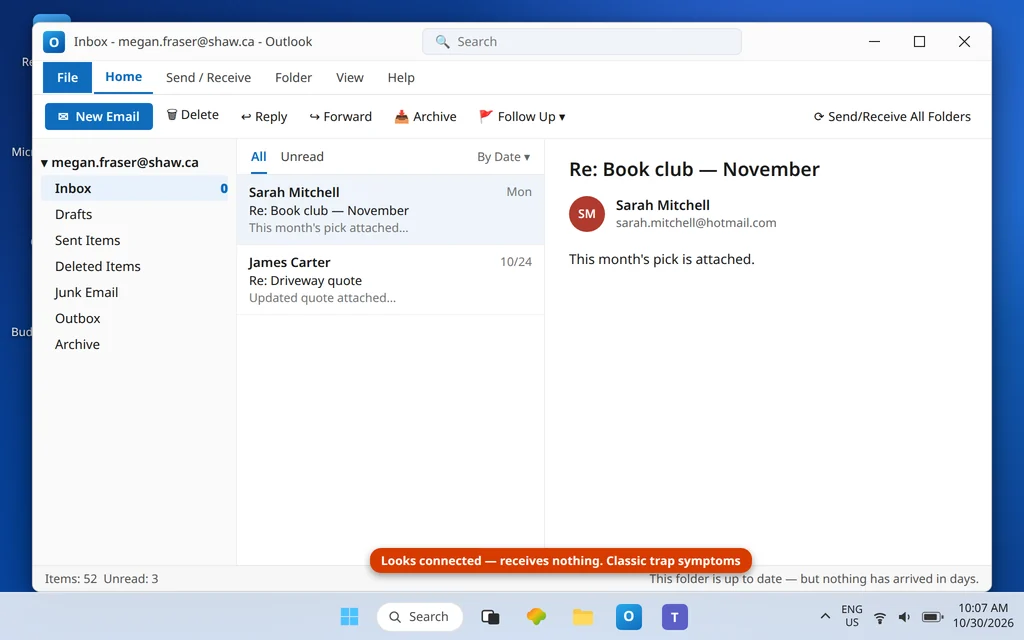
Shaw email not receiving in Outlook is usually caused by two Shaw-only traps, and both are easy to miss.
Shaw email defeats Outlook users with two traps that no other provider in this series has. Trap one: if your Shaw address is also the address you use as your Microsoft account, Outlook may quietly create the account as an Exchange account — and a Shaw mailbox is not Exchange, so it connects to nothing and receives nothing, with a setup that looks successful. Trap two: Shaw’s user name rule is the opposite of almost every other provider’s — your sign-in name is your address without the @shaw.ca part. Type the full address, as every instinct (and every generic guide) tells you, and sign-in fails.
Get past those two and the settings themselves are simple. This guide fixes the receiving side for @shaw.ca addresses; if you cannot send, the same settings table (outgoing mail.shaw.ca : 587) applies and the general send checks are in Outlook Not Sending Emails but Can Receive. For receiving problems on other providers, see Outlook Not Receiving Emails but Can Send.
Quick Answer: In Outlook’s account settings, confirm the account type is IMAP (not Exchange — if it says Exchange and your Shaw address doubles as your Microsoft account, remove it and re-add manually as IMAP). Set the incoming server to
imap.shaw.ca, port 993, SSL; the outgoing server tomail.shaw.ca, port 587, TLS (note: mail, not “smtp” —smtp.shaw.cais an internet invention, not Shaw’s server). Your user name is your address without @shaw.ca — just the part before it. Manage the password through MyRogers (Shaw) / myshaw.ca; Shaw has no app-password flow.
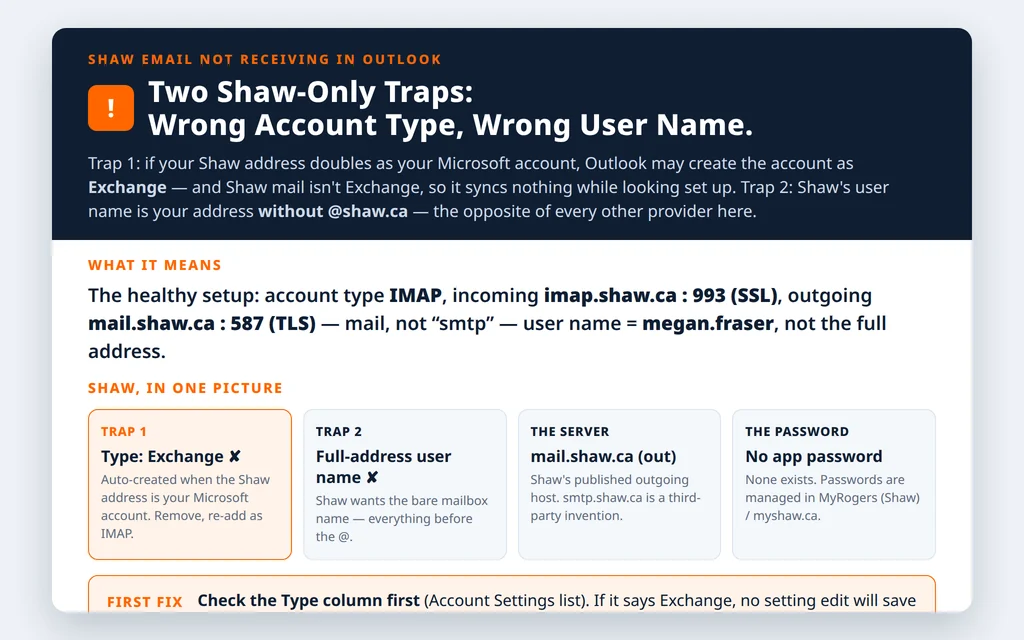
Table of Contents
Fix 1 — Trap one: check the account type is IMAP, not Exchange
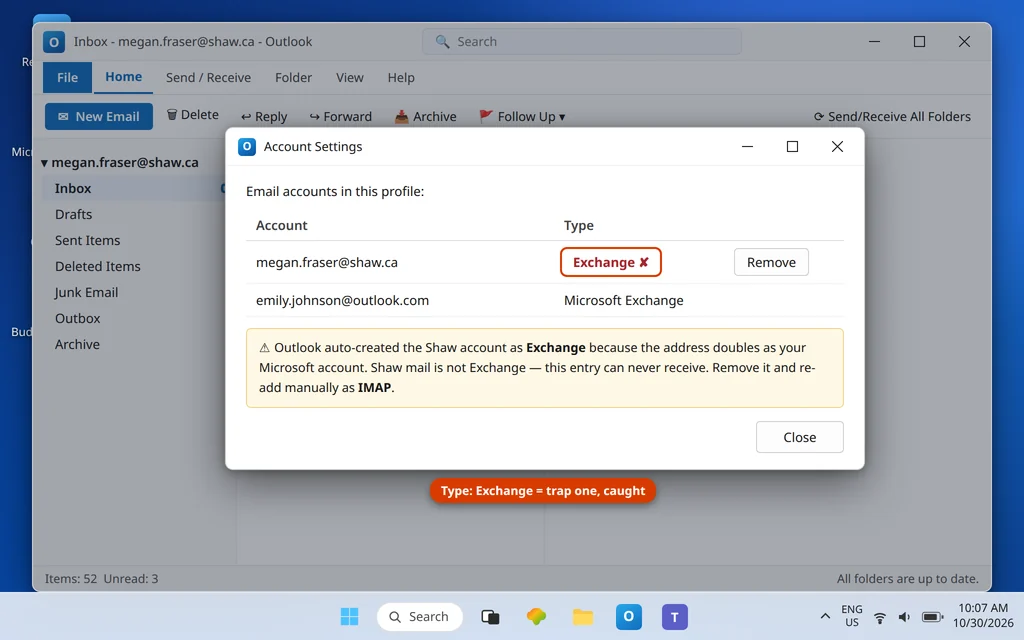
Open File → Account Settings → Account Settings and look at the Type beside your Shaw account. If it says Exchange (or “Microsoft Exchange”) and you never set up any Exchange service, this is the trap: Outlook auto-created it that way because your Shaw address is also your Microsoft account name/alias. An Exchange-type entry will never pull Shaw mail. The fix is not to edit it (the type cannot be converted) but to remove that entry and re-add the account manually as IMAP (Fix 3). Your mail is on Shaw’s servers, so removal costs nothing with IMAP.
Fix 2 — The correct Shaw settings table
From Shaw’s (Rogers/Shaw) published email settings:
| Setting | Value |
|---|---|
| Incoming server (IMAP) | imap.shaw.ca : 993, SSL |
| Incoming server (POP) | pop.shaw.ca : 995, SSL/TLS |
| Outgoing server | mail.shaw.ca : 587, TLS |
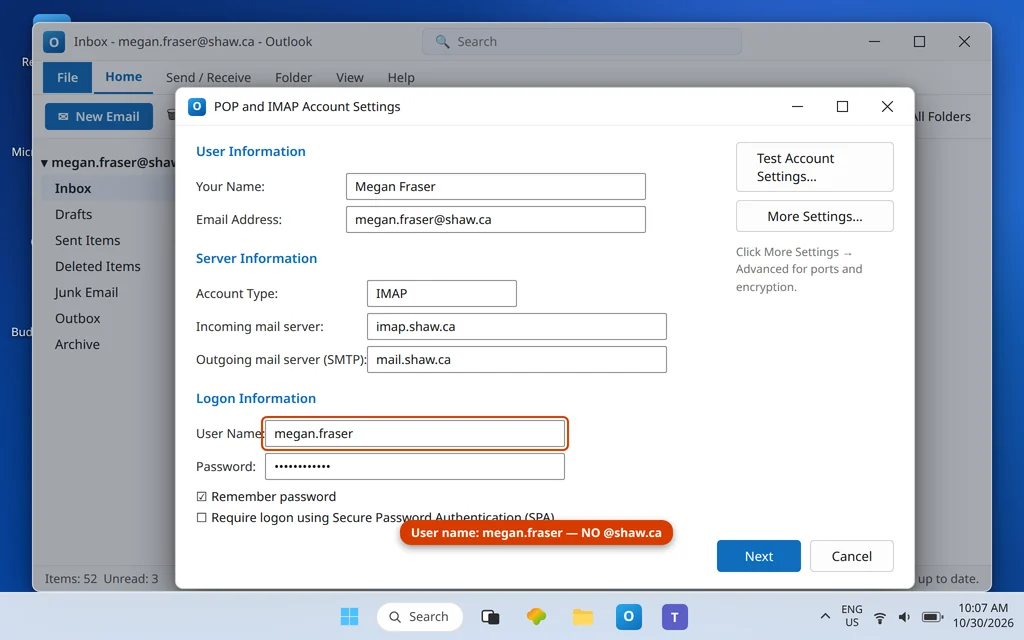
| User name | Your address WITHOUT @shaw.ca (e.g. megan.fraser) |
| Password | Your Shaw email password (managed via MyRogers (Shaw) / myshaw.ca) |
| App password | None exists — Shaw has no app-password flow |
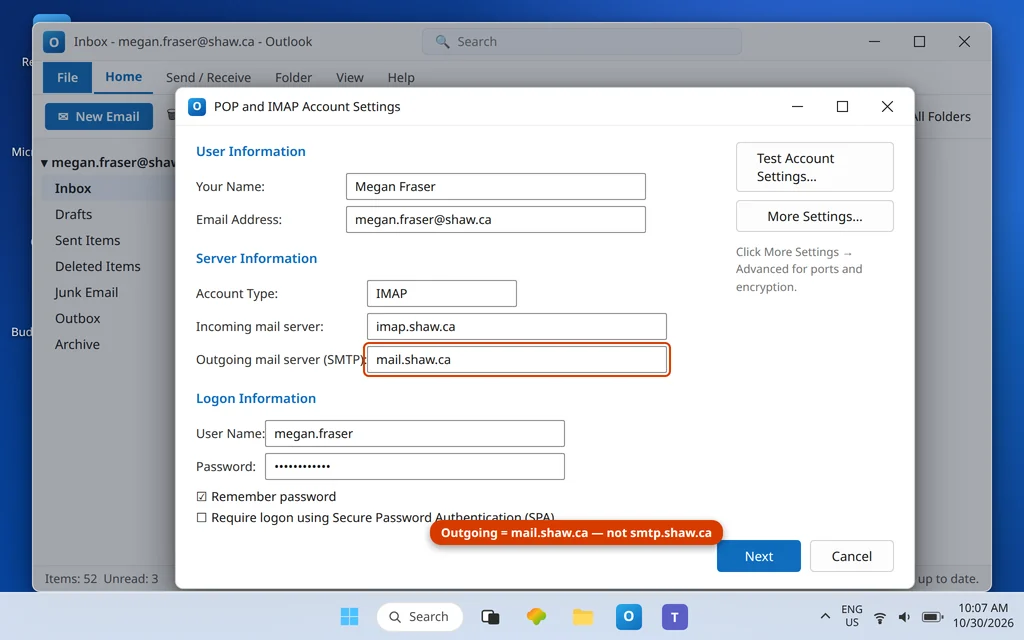
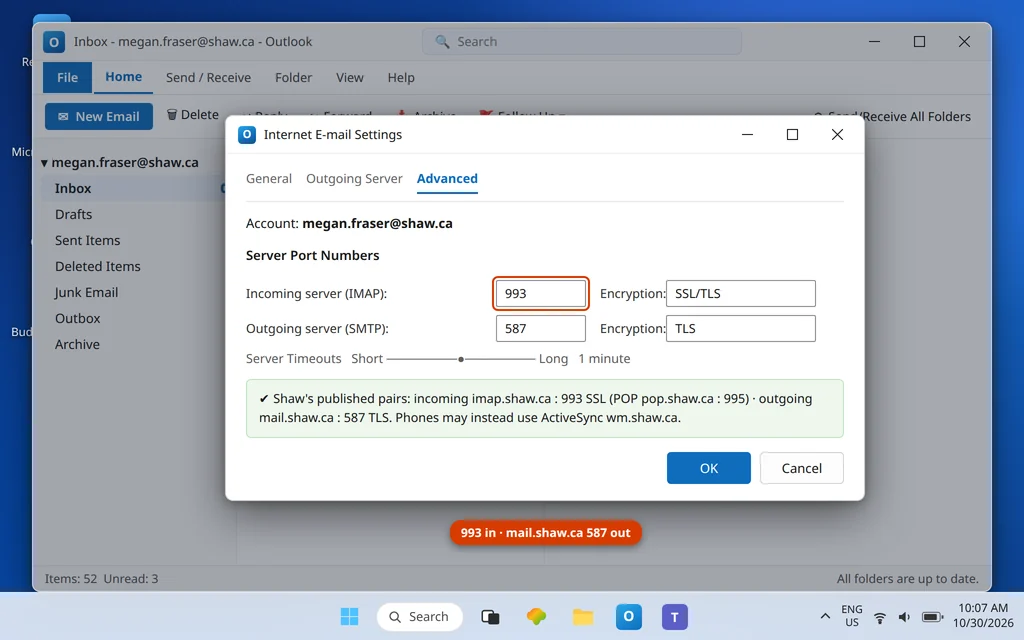
Two lines deserve emphasis. The outgoing host really is mail.shaw.ca — the name smtp.shaw.ca that circulates on third-party sites is not Shaw’s published server, and setups using it fail or limp depending on the network. And the user name rule (Fix 3’s twin): on Shaw, less is more.
Fix 3 — Trap two + clean re-add: user name without the domain
When you re-add the account, choose Advanced options → Let me set up my account manually → IMAP, enter the Fix 2 table, and in the user name field type only the part of your address before @shaw.ca (for megan.fraser@shaw.ca, the user name is megan.fraser). Full-address user names are the #1 typed-in-good-faith Shaw error. Manual setup matters doubly here: automatic setup is what walked you into the Exchange trap in Fix 1.
Fix 4 — Check webmail before blaming Outlook
Sign in to Shaw Webmail and confirm the missing mail is actually there. If webmail is empty too, the delivery problem is upstream (check Spam and any filters there). One cautious extra from Shaw community guidance: webmail’s Classic mode has been reported necessary for IMAP/POP access to behave on some accounts — if everything else in this guide checks out and webmail works while Outlook still cannot fetch, it is worth toggling webmail to Classic mode and retesting; treat that as a Shaw-community tip rather than a headline setting. Password problems are handled through MyRogers (Shaw) / myshaw.ca — reset there, then update Outlook.
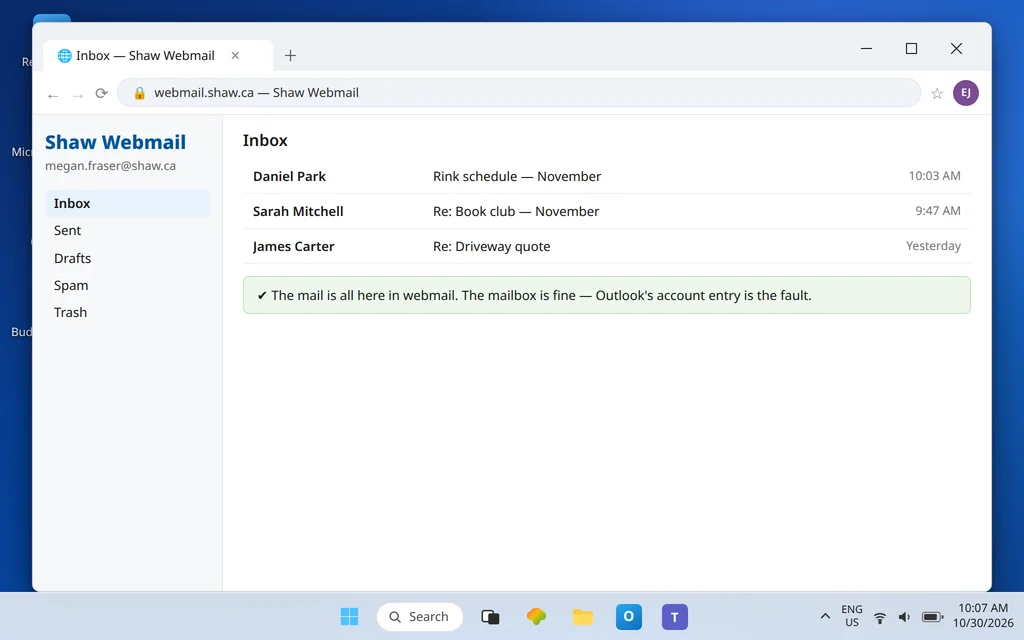
For phones and tablets, note the third route Shaw publishes: Exchange ActiveSync with server wm.shaw.ca (SSL) — that is a mobile sync option, not the desktop Outlook fix, but it explains why the phone may receive happily while the PC fails.
Fix 5 — The reset desync: changed your password in MyRogers? Update Outlook
Shaw passwords are managed in MyRogers (Shaw) / myshaw.ca, and a reset there — a forgotten-password flow, a support call, a security tidy-up — changes the credential instantly on Shaw’s side while Outlook keeps offering the old one. The result is a receiving failure that begins the same day and presents as a password prompt that rejects the password you are “sure” is right — because it was, until the reset. If receiving broke around a password change, do not troubleshoot servers: type the new password into Outlook’s prompt, tick Save this password, and the account reconnects. The same desync explains a subtler case: mail works on the phone (where you updated it) and fails on the PC (where you did not). Keep the two in step and this entire failure class disappears.
Fix 6 — If Send/Receive shows errors: read them against the traps
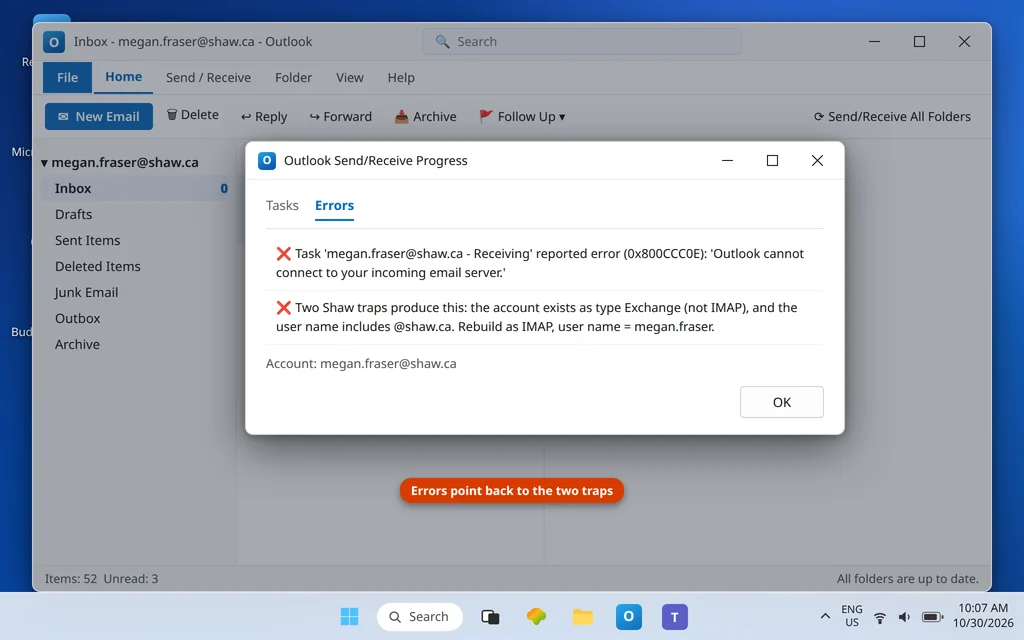
Receiving-task errors on a Shaw account almost always decompose into the traps above: an Exchange-type entry trying to sync a non-Exchange mailbox, a full-address user name being rejected, or the invented smtp.shaw.ca sitting in a field. Correct all three, press Send/Receive All Folders, and watch the account complete cleanly. Persistent connection codes beyond that are catalogued in our Error Codes hub.
Confirm it worked
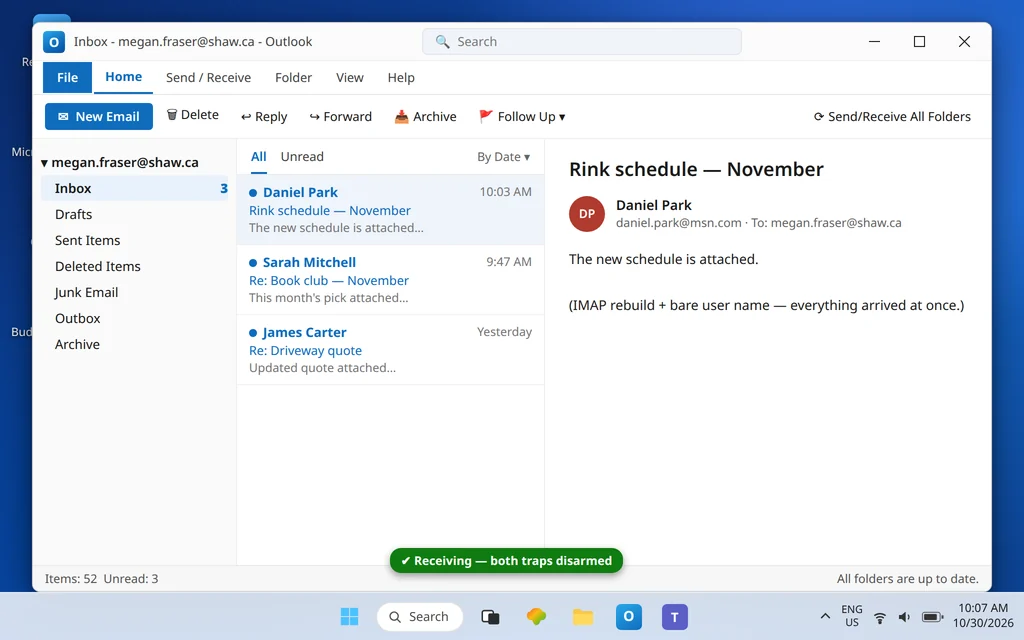
Webmail’s new messages appear in Outlook, the account type column says IMAP, and an Outlook restart produces no password prompt.
How to stop Shaw email not receiving in Outlook from happening again
- If your Shaw address is your Microsoft account, always add it manually as IMAP — on every new PC, forever. Automatic setup will try the Exchange trap each time.
- “User name = no domain” is the Shaw rule. Write it in your password manager entry; it contradicts every other provider you own.
- Outgoing is mail.shaw.ca. Treat any guide (or wizard guess) saying smtp.shaw.ca as untrustworthy for this provider.
- No app password exists to lose. Password changes happen in MyRogers (Shaw)/myshaw.ca, then get typed into Outlook once.
Frequently asked questions
What are the correct Shaw email settings for Outlook?
IMAP incoming: imap.shaw.ca port 993 SSL (POP: pop.shaw.ca 995). Outgoing: mail.shaw.ca port 587 TLS. User name: your address without the @shaw.ca part. Password: your Shaw email password, managed through MyRogers (Shaw) / myshaw.ca. These are Shaw’s own published settings — and note the outgoing host is mail.shaw.ca, not smtp.shaw.ca.
Why did Outlook set up my Shaw account as Exchange?
Because your Shaw address is also the name/alias of your Microsoft account, and Outlook’s automatic setup prefers Exchange for addresses it associates with Microsoft accounts. Shaw mailboxes are not Exchange, so the entry syncs nothing. Remove it and re-add the account manually as IMAP with the settings in this guide — the type cannot be edited in place.
Why does Shaw reject my full email address as the user name?
Because Shaw’s sign-in convention is the older style: the user name is just the mailbox name — the part before @shaw.ca. It is the opposite of most modern providers, which is exactly why it trips people up. Use the bare name in Outlook’s user name field (the email address field still holds the full address).
Is smtp.shaw.ca a real server?
It is not Shaw’s published outgoing server. Shaw’s official settings name mail.shaw.ca (port 587, TLS) as the outgoing host; smtp.shaw.ca circulates on third-party sites. If your setup uses it and works on your network, you are on luck rather than documentation — switch to mail.shaw.ca so the setup matches what Shaw supports.
Shaw webmail works but Outlook says “Disconnected” — which trap is that?
A “Disconnected” status with no prompt usually follows Trap 1’s logic: the account entry is the Exchange-type one, and it has quietly given up trying to sync a mailbox that is not Exchange. Check the Type column in Account Settings first. If the type genuinely says IMAP and the status persists, Work Offline mode is the next suspect (Send/Receive tab — it survives restarts and shows no error), and after that the reset desync in Fix 5: a password changed in MyRogers (Shaw) that Outlook still has not been told about. All three are Shaw-flavored versions of “the account entry, not the mailbox, is broken.”
Does Shaw email need an app password for Outlook?
No. There is no Shaw app-password flow — do not let a generic guide send you looking for one. Your ordinary Shaw email password is the credential; manage or reset it through MyRogers (Shaw) / myshaw.ca and type it into Outlook.
My Shaw mail works on my phone but not in Outlook. Why?
Phones commonly use Shaw’s Exchange ActiveSync option (server wm.shaw.ca), which sidesteps both desktop traps entirely. The PC failure is almost certainly the Exchange-type account entry or the full-address user name in desktop Outlook — Fixes 1–3. The mailbox itself is demonstrably fine if the phone is receiving.
Receiving again — or still caught in a trap? Contact us at servicedesk@howtofixerroronline.com or through our Contact page and tell us what the Type column says for your Shaw account and the exact user name you have entered (never the password). We will never ask for your password.