
Spectrum Email Not Receiving in Outlook: Domain-Split Server Fixes
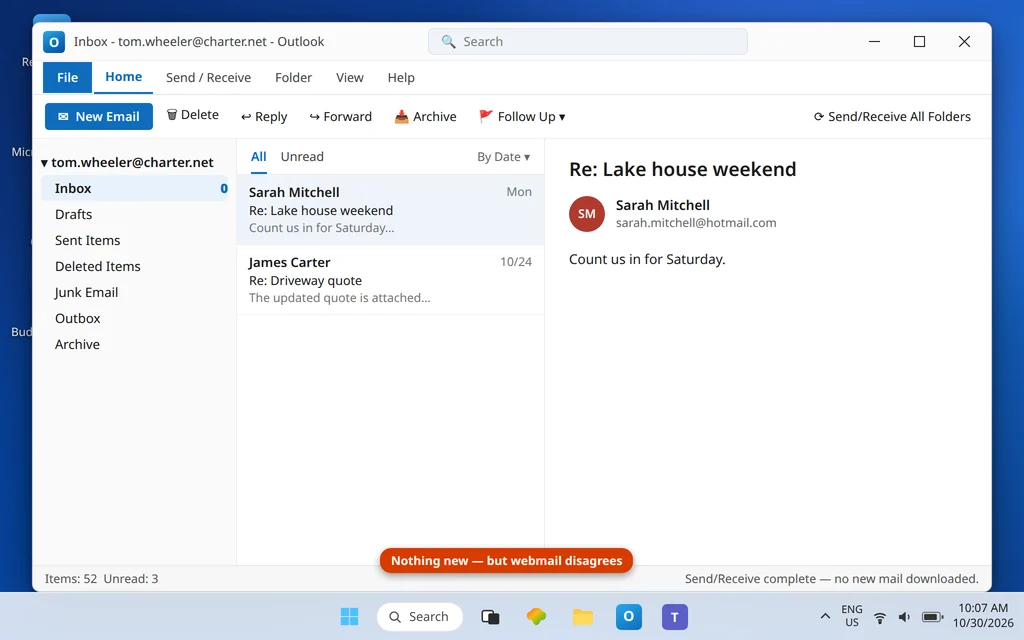
Spectrum email not receiving in Outlook usually means Outlook is asking the wrong family’s server.
Spectrum’s inbox problem is Spectrum’s identity problem: one brand, several inherited email systems. Whether Outlook can fetch your mail depends on which family your address belongs to. @charter.net and @spectrum.net mailboxes are served by mobile.charter.net; legacy @twc.com and @rr.com mailboxes are served by mail.twc.com. Point Outlook at the other family’s server — something auto-setup does constantly — and Send/Receive completes with a sign-in failure or, sneakier, with “success” and no new mail at all.
This guide fixes the receiving side for both families, including the TWC family’s signature trap (SPA) and a 2025 new-Outlook breakage specific to @charter.net accounts. If instead you cannot send, the mirror guide is Spectrum Email Not Sending in Outlook. For receiving problems across every provider, see Outlook Not Receiving Emails but Can Send.
Quick Answer: Match the incoming server to your address domain. @charter.net / @spectrum.net: incoming server
mobile.charter.net, IMAP port 993 (SSL) — POP 995 — user name = your full address, password = your normal Spectrum email password. @twc.com / @rr.com: incoming servermail.twc.com, port 993 (POP 995), and make sure Secure Password Authentication (SPA) is OFF. Spectrum has no app password, so never chase one. Confirm the mail exists first at webmail.spectrum.net.
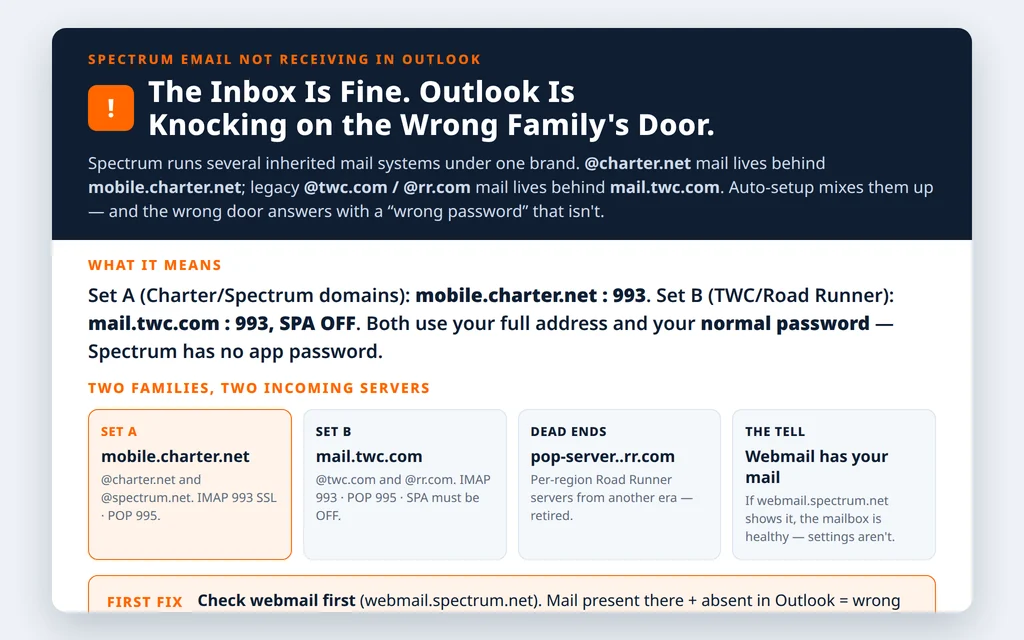
Table of Contents
Fix 1 — Prove the mail exists: Spectrum Webmail
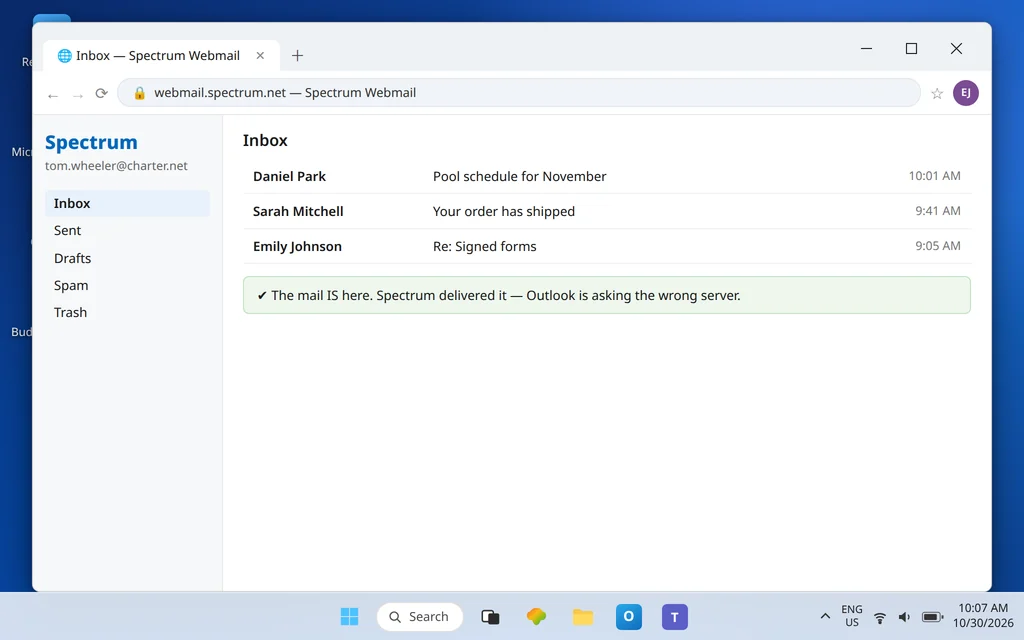
Open webmail.spectrum.net and sign in with your normal email password. If the missing messages are in webmail, Spectrum has your mail and everything below is Outlook configuration. If webmail is also missing them (or you cannot sign in), the problem is account-side — check Spam there, and skip ahead to Fix 5.
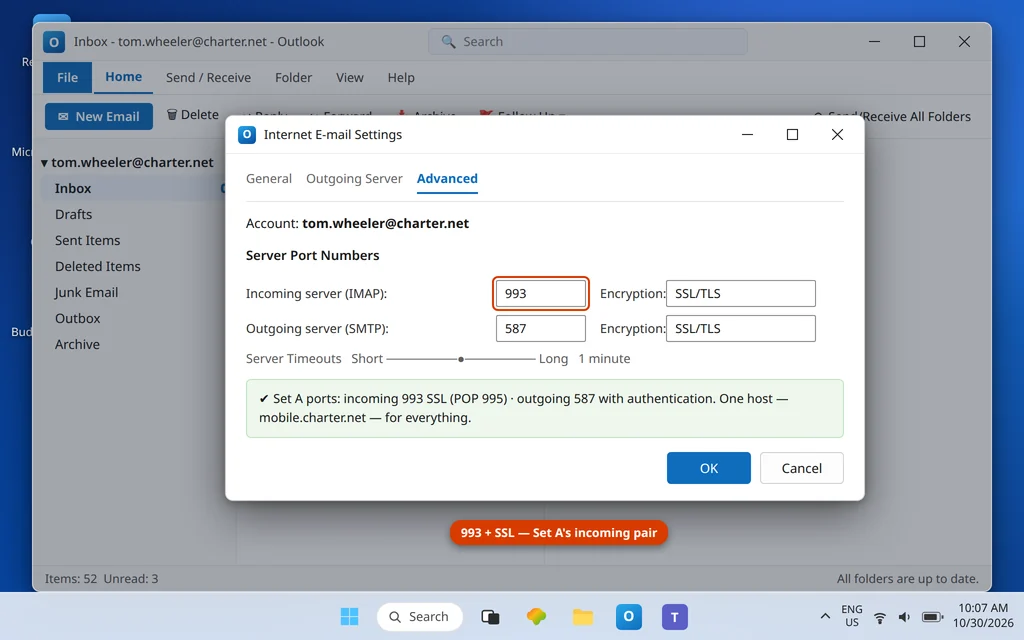
Fix 2 — Set A domains (@charter.net, @spectrum.net): mobile.charter.net
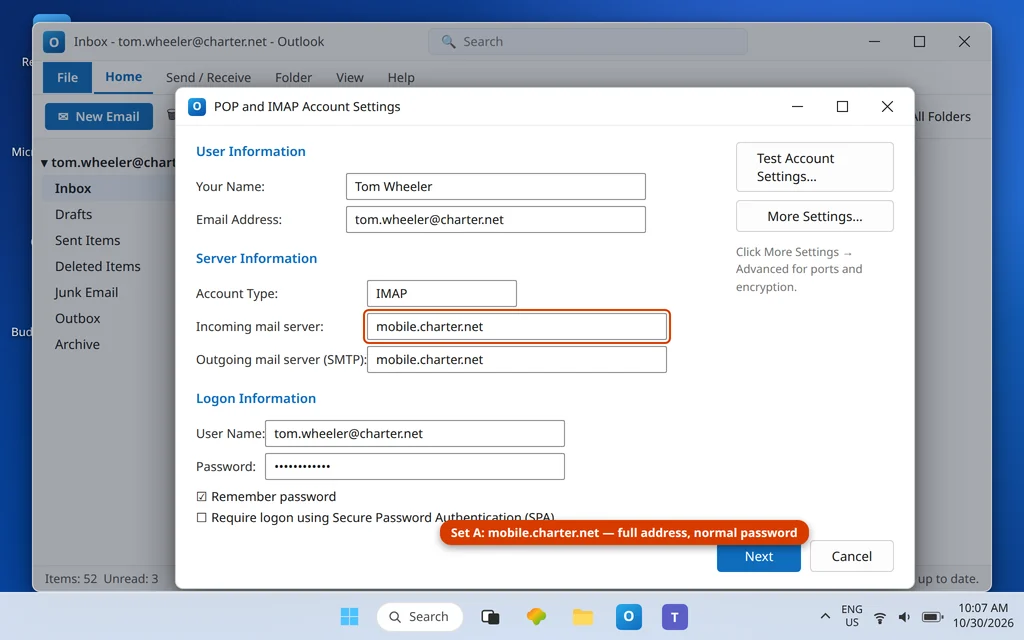
In File → Account Settings → Change, the incoming side for Set A is a single host for everything:
| Setting | Set A — @charter.net, @spectrum.net |
|---|---|
| Incoming server (IMAP) | mobile.charter.net: 993 SSL/TLS |
| Incoming server (POP) | mobile.charter.net: 995 SSL/TLS |
| Outgoing (for reference) | mobile.charter.net: 587, authentication on |
| User name | Full email address |
| Password | Normal Spectrum email password |
Fix 3 — Set B domains (@twc.com, @rr.com): mail.twc.com, SPA OFF
Legacy Time Warner Cable and Road Runner addresses live on the other host:
| Setting | Set B — @twc.com, @rr.com |
|---|---|
| Incoming server (IMAP) | mail.twc.com: 993 SSL/TLS |
| Incoming server (POP) | mail.twc.com: 995 SSL/TLS |
| Outgoing (for reference) | mail.twc.com: 587 STARTTLS |
| SPA (Secure Password Authentication) | Must be OFF |
| User name / password | Full address / normal email password |
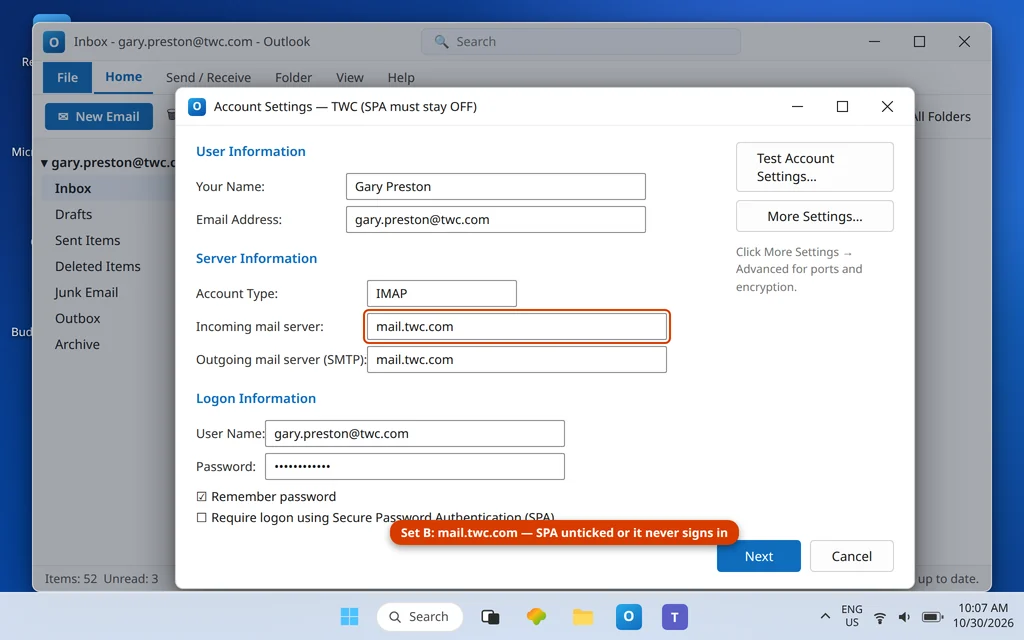
The SPA checkbox sits on the main account settings screen, and Set B rejects SPA sign-ins — a ticked box left over from an ancient setup guide produces a permanent, misleading password failure. Also retire any per-region Road Runner servers (pop-server.<region>.rr.com): they no longer resolve to anything useful.
Fix 4 — Charter.net in the NEW Outlook: the 2025 INVALIDCREDENTIALS breakage
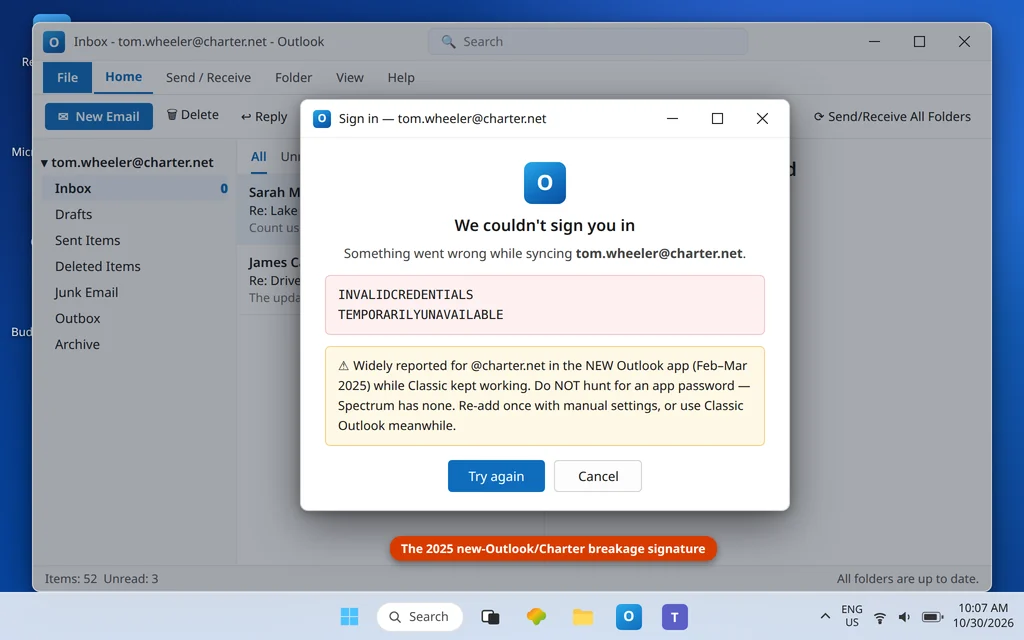
If your @charter.net account receives fine in Classic Outlook (or webmail) but the new Outlook app reports errors containing INVALIDCREDENTIALS or TEMPORARILYUNAVAILABLE, you have met a breakage widely reported by Charter users in February–March 2025, when new Outlook + @charter.net accounts stopped syncing while Classic kept working for many of the same people. Practical handling: (1) do not keep re-entering the password — Spectrum has no app password and the prompt will not fix it; (2) remove and re-add the account in new Outlook once, entering the Set A table manually; (3) if it persists, use Classic Outlook or webmail for that account meanwhile — the fault in that episode sat between the app and the provider, not in your settings.
Fix 5 — Big folders and the offline window: when “not receiving” is really “not downloading”
If the right family’s settings are in place and recent mail arrives but older mail never shows, you may not have a receiving fault at all. In File → Account Settings → Change, Classic Outlook’s Mail to keep offline slider limits how much history is downloaded locally — a slider sitting at 1 or 3 months makes everything older invisible in Outlook while it sits happily in webmail. Slide it to All for the full mailbox. The companion trap is a huge folder still mid-download: a first sync of a multi-gigabyte Spectrum inbox can take hours over IMAP, during which Send/Receive looks finished but the folder counts keep creeping — leave Outlook open and connected and let it finish before judging the setup. And if one specific folder lags while the Inbox is current, right-click the folder → Properties → Synchronization to see whether it has ever completed a sync; a never-synced folder usually just needs a manual Update Folder (Send/Receive tab) after the account settings are correct.
Fix 6 — Rebuild the account manually if the entry itself is tangled
Accounts that have been edited through multiple wrong guesses sometimes keep a poisoned credential or a hybrid of both families’ settings no matter how carefully you retype them. The clean exit: remove the account (File → Account Settings → Remove) and re-add it via Add Account → Advanced options → Let me set up my account manually → IMAP, typing your family’s table (Fix 2 or Fix 3) once, correctly, with your normal password. IMAP keeps everything on Spectrum’s servers, so the rebuild loses nothing and the full mailbox downloads again — set the offline slider (Fix 5) to All before you walk away from it. Never let the wizard auto-detect a Spectrum rebuild; detection is how most of these accounts got tangled in the first place.
Fix 7 — Account-side causes: holds, quota, and the missing-mail check
If webmail in Fix 1 was also empty or refused your sign-in: complete any security verification Spectrum presents in the browser, check the mailbox quota (a full mailbox stops deliveries upstream), and confirm the sender’s messages are not landing in webmail’s Spam folder with a filter sweeping them away from the inbox Outlook mirrors. Also verify you are checking the right mailbox — households often hold both a @charter.net and a legacy @rr.com address, and mail sent to one never appears in the other.
Confirm it worked
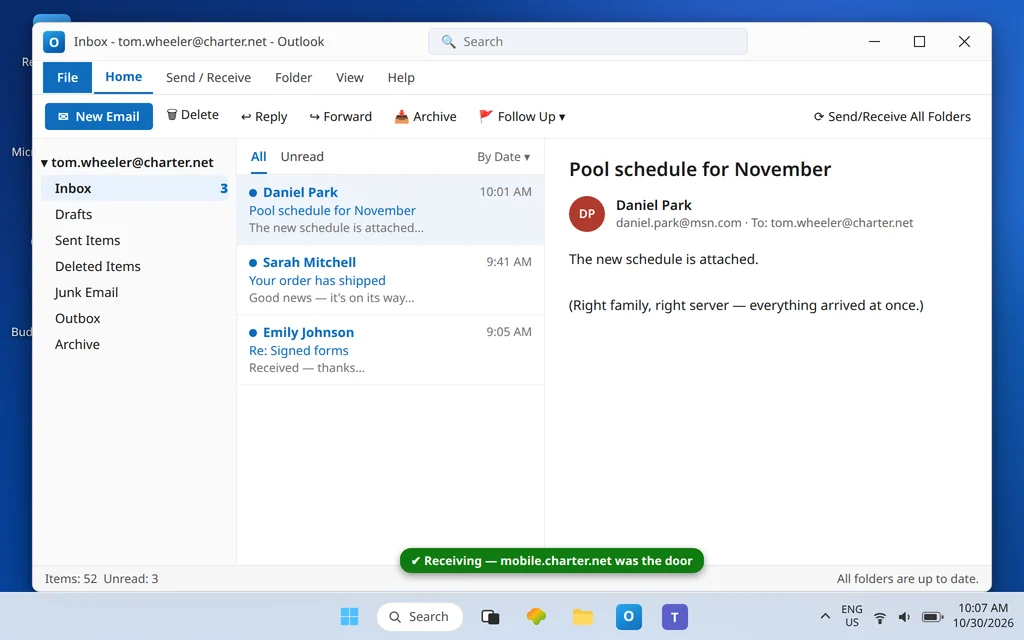
Press Send/Receive All Folders and compare against webmail: the same new messages should now be in Outlook, and the clean state should survive an Outlook restart with no password prompt.
For the provider’s own reference, see Spectrum’s official Outlook setup guide.
How to stop Spectrum email not receiving in Outlook happening again
- Record your set (A or B) with the account. Every Spectrum fix starts from the family; write it in your password manager entry.
- Refuse auto-detection on rebuilds. Wizard guesses are the main way the wrong family’s server gets in.
- Keep SPA off on TWC/RR accounts permanently.
- One credential, everywhere: your normal Spectrum password. Any prompt suggesting an app password is malfunctioning software, not a Spectrum requirement.
Frequently asked questions
What are the correct Spectrum IMAP settings for Outlook?
By domain family. @charter.net / @spectrum.net: incoming mobile.charter.net, port 993 (IMAP, SSL) or 995 (POP). @twc.com / @rr.com: incoming mail.twc.com, port 993 or 995, with SPA off. Both families use your full address as the user name and your normal Spectrum email password — there is no app password for Spectrum.
Why does Outlook say my Spectrum password is wrong when it works in webmail?
Usually because Outlook is asking the wrong family’s server, or (on TWC accounts) offering SPA sign-in the server rejects — both present as “wrong password.” Compare every field against your family’s table in Fixes 2–3. If the same failure appears in the new Outlook app for a @charter.net account with wording like INVALIDCREDENTIALS / TEMPORARILYUNAVAILABLE, see Fix 4 — that app-side breakage was widely reported in early 2025.
Does Spectrum need an app password for Outlook?
No. Spectrum does not operate an app-password system. Your ordinary email password is the credential in every app. If new Outlook displays an app-password prompt for a Spectrum account, treat it as a symptom of a failed sign-in (wrong server set, SPA, or the app-side issue), not as an instruction.
My @rr.com email stopped receiving years of history. Where did it go?
Road Runner addresses are Set B now — served by mail.twc.com. If your Outlook still points at a retired regional server (pop-server.<region>.rr.com), it has been asking a dead host. Rebuild the account manually on mail.twc.com: 993 with SPA off; IMAP mail sits on Spectrum’s servers and downloads again.
Webmail shows no new mail either. Is Outlook still at fault?
No — if webmail.spectrum.net does not have the messages, they were never delivered to the mailbox Outlook mirrors. Check webmail’s Spam and filters, the mailbox quota, and that senders are using the exact address (charter.net vs rr.com mailboxes are different mailboxes). Provider-side delivery issues need Spectrum, not Outlook settings. Our Error Codes hub covers the codes Outlook shows when the connection itself fails.
Classic Outlook receives my charter.net mail but new Outlook does not. Which do I trust?
Trust Classic — that split was the signature of the February–March 2025 new-Outlook/Charter breakage reported across user forums. Re-add the account in new Outlook once with manual Set A settings; if INVALIDCREDENTIALS persists, keep the account in Classic or webmail until the app-side issue clears. Your mailbox and settings are not the broken part.
Receiving again — or still stuck between two server families? Contact us at servicedesk@howtofixerroronline.com or through our Contact page and tell us your address domain, which Outlook (Classic or new), and the exact error text. Never send us your password — we will never ask for it.